Solutions
Hardware
Software
Services
Support and Downloads
About Zebra
TC701 Touch Computer Quick Start Guide
Charging the Device
Charging Accessories
Charge/USB-C Cable
TC701 Touch Computer
TC701 Touch Computer
Model Number
Unpacking the TC701
Features
Setting Up the Device
Installing a SIM Card (WWAN Only)
Installing the MicroSD Card
Installing a Battery
Using the Rechargeable Li-Ion Battery with BLE Beacon
Charging the Device
Charging the Spare Battery
Charging Indications
Charging Temperature
Charging Accessories
1-Slot Fast-Charging Cradle
1-Slot Ethernet Charging Cradle
1-Slot 2-Device Charging Cradle
1-Slot Device and Spare Battery Charging Cradle
1-Slot Device and Spare Battery Ethernet Charging Cradle
4-Slot Battery Charger
5-Slot Fast-Charging Cradle
5-Slot Ethernet Charging Cradle
5-Slot Charging Cradle for Devices and Spare Batteries
5-Slot 10-Devices Charging Cradle
Charge/USB-C Cable
Scanning with the Device
Ergonomic Considerations
Service Information
Charge/USB-C Cable
View content for :
Platform:
All Platforms
HTML
Charge/USB-C Cable
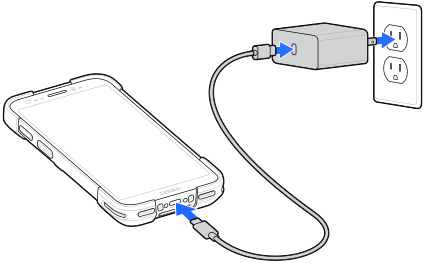
The Charge/USB-C cable is used to charge the device's battery and to facilitate data transfer between the device and a host computer.
Charging Accessories
×