Solutions
Hardware
Software
Services
Support and Downloads
About Zebra
US Home Page
US Home Page
WS Picking User and Administration Guide
Administration Features
Products
Modifying Existing Products
WS Picking User and Administration Guide
WS Picking User and Administration Guide
About this Guide
Icon Conventions
Notational Conventions
Service Information
System Overview
System Architecture
Demonstration
Production Customization Overview
Administration Features
Running the Picking Server
Logging In
Orders
Adding Orders
Modifying Existing Orders
Products
Adding New Products
Modifying Existing Products
Users
Adding a User
Modifying Existing Users
Application Overview
Installing the WS Picking Application
Logging In Remotely
Picking an Order
Modifying Existing Products
Modifying Existing Products
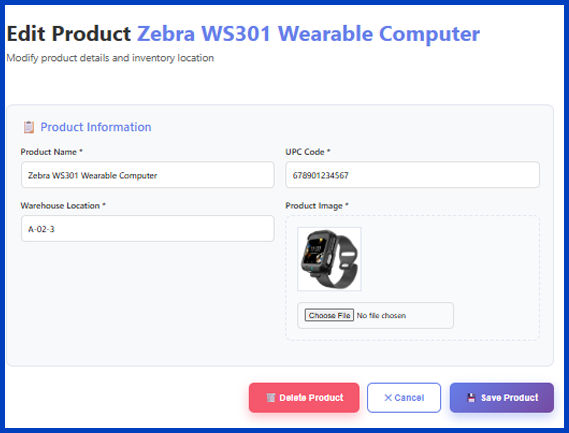
Modify or delete existing products in the system.
Click the desired product.
The
Edit Product
screen displays.
(Optional) Click
Delete Product
to remove the product; otherwise, proceed to the next step.
Click
OK
when the confirmation dialog box displays.
Make the necessary changes.
Click
Save Product
.
Click
OK
.
Products
×