Solutions
Hardware
Software
Services
Support and Downloads
About Zebra
US Home Page
US Home Page
WS Picking User and Administration Guide
Administration Features
Users
Modifying Existing Users
WS Picking User and Administration Guide
WS Picking User and Administration Guide
About this Guide
Icon Conventions
Notational Conventions
Service Information
System Overview
System Architecture
Demonstration
Production Customization Overview
Administration Features
Running the Picking Server
Logging In
Orders
Adding Orders
Modifying Existing Orders
Products
Adding New Products
Modifying Existing Products
Users
Adding a User
Modifying Existing Users
Application Overview
Installing the WS Picking Application
Logging In Remotely
Picking an Order
Modifying Existing Users
Modifying Existing Users
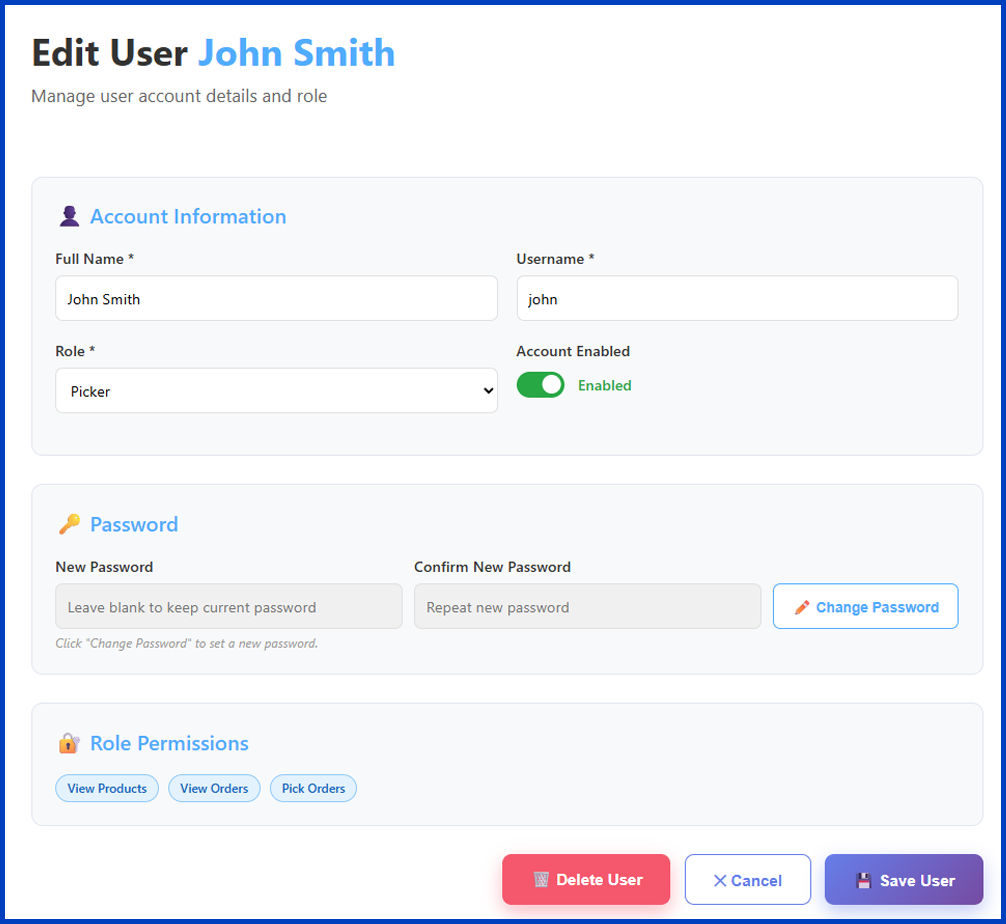
Find, modify, or delete an existing user account.
You must have administrator privileges to manage user accounts.
Keep the user database up to date by modifying user details or removing accounts that are no longer needed.
Use the
Search
bar to find the desired user account.
Select the user account from the search results.
The user's account details page displays.
(Optional) Click
Delete User
to remove the account.
A dialog box displays to confirm the action.
Click
OK
to permanently delete the user.
Make the necessary changes to the account details.
Click
Save User
.
Click
OK
.
The selected user's account reflects the updated information, or the account no longer displays in the
Users
list.
Users
×