Identification of AD Attributes

Identification of AD Attributes

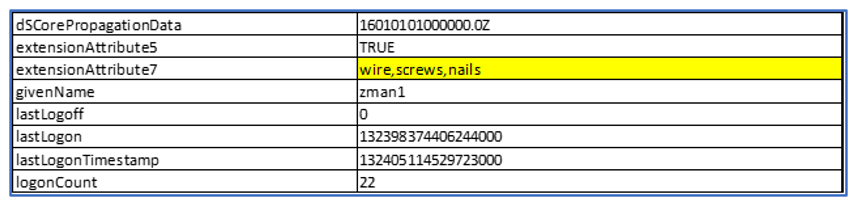
  1. Using an Active Directory browser, find and examine a specific User. Roles are commonly descriptive words, so select an attribute that supports alphanumeric input.
    In this case, we are using ‘extensionAttribute7’ to specify the Wire, Screws, and Nails Roles.
    Role and Attribute Example
    Case sensitivity must be observed when generating the attribute Roles, described later in this document.
  2. Next, review the attributes for the user.
    In this view, all populated attributes move to the top of the list and are alphabetized. Review to become familiar with what is populated.
    Attributes
    Attribute Type
    Value
    cn
    zman1
    instanceType
    4
    nTSecurityDescriptor
    objectCategory
    CN=Person,CN=Schema,CN=Configuration,DC=PTTPRO,DC=ZEBRA
    objectClass
    organizationalPerson
    objectClass
    person
    objectClass
    top
    objectClass
    user
    accountExpires
    9223372036854770000
    badPasswordTime
    132397473873874000
    badPwdCount
    0
    businessCategory
    OAUTH2
    codePage
    0
    company
    Zebra
    countryCode
    0
    department
    Minnetonka
