Solutions
Hardware
Software
Services
Support and Downloads
About Zebra
Workcloud Communication Profile Manager Customer Administrator Guide
System Management
Device User Role Management
Edit Device User Roles
Workcloud Communication Profile Manager Administrator Guide
Workcloud Communication Profile Manager Administrator Guide
About This Guide
Chapter Descriptions
Notational Conventions
Icon Conventions
Service Information
Revision History
Getting Started
Introduction to Workcloud Communication Profile Manager
Interconnection Details
Logging In to the Profile Manager Portal
Logging Out of Profile Manager Portal
Resetting Your Administrator Password
Resetting Your Administrator Password Before Logging In
Resetting Your Administrator Password After Logging In
Main Screen in Profile Manager
System Controls Panel
Navigating the Profile Manager Portal Dashboard
Dashboard Quick Link Buttons
Return to the Dashboard
Required Information
Icons
Slider Switches
Success and Error Messages
Search and Filter Functionality
System Management
Tenant Configuration
View Tenant Configuration
Update Tenant Configuration
Portal User Role Management
View Portal User Roles
Create Portal User Roles
Edit Portal User Roles
Delete Portal User Roles
Portal User Management
Create Portal Users
Edit Portal Users
Delete Portal Users
Device User Attribute Management
Create Device User Attributes
Edit Device User Attributes
Device User Role Management
Create Device User Role
Edit Device User Roles
Delete Device User Roles
Device User Management
View Device Users
Add and Update Device Users
Add or Update Multiple Device Users
Add a Device User
Edit a Device User
Delete a Device User
Refresh a Device User Status
Device Management
License Management Through Device Licenses
View Devices
Add/Enroll and Update Devices
Add/Update Multiple Devices/Enroll Multiple Devices (Bulk Import Devices)
Add a Device
Edit a Device
Delete/De-Enroll a Device
Refresh a Device Status
Profile Definition Management
Create Profile Definitions
Edit Profile Definitions
Delete Profile Definitions
Profile Configuration Management
Create Profile Configurations
Edit Profile Configurations
Delete Profile Configurations
Rule Management
View Rules
Create Rules
Publish Rules
Delete Rules
System Report Management
Generate Reports
Export Reports
Create Report Templates
Edit Report Templates
Delete Report Templates
Identity Provider Import Management
Device User Attribute Mappings
View Mappings
Add an Attribute, Constant or Function
Add Attributes
Add Function
Find Function
Substitute Function
Replace Function
Create Extension During User Import
Integrating Zebra Enterprise Messaging Server (ZEMS) During User Import
Clear an Attribute Mapping
Import Job Management
View Import Jobs
Create Import Jobs
Edit Jobs
Delete Jobs
Run Import Jobs
View Import Job History
Import Job Notifications
View Import Job Notifications
Create Import Job Notifications
Edit Import Job Notifications
Delete Import Job Notifications
Import Job Scheduler
View Import Job Schedules
Create Import Job Scheduler
Edit Import Job Schedulers
Delete Import Job Schedulers
Client Device Setup Using Telephony Manager and Profile Manager
Configure Telephony Manager Using a CSV File
Manually Configure Telephony Manager (for technical support)
Configure Zebra Profile Manager
Confirm the End-to-End Configuration of Telephony Setup
Important Notes About Verifying Correct End-to-End Configuration
Telephony Management
Extensions
View Extensions
Refresh Extensions
Extension Import Management
Other Telephony Management Options
Profile Manager Licenses
Profile Manager Device Licenses
View Application Licenses
Update Application Licenses
Release License
Intents and Actions
Profile Manager Client Configuration File Elements
Support for Third-Party Launchers
ADB Supported Commands
Install the PFM Client
Handling the PFM Configuration File
Starting the Profile Client
Reconfiguring a Running Client
Start/Restart the Client with a New Configuration
Sending Credentials from a Third Party Launcher
Bulk Import Device Users
Description
Assumptions
Import Process
Multiple Role Values from Attributes
Description
Assumptions
Configuration Process
Overview
Identification of AD Attributes
Import Attribute Transformations
Create an Import Job
Researching Provisioning Errors
Successful Provisioning and Attribute Mapping
Role Level Selection
Dependencies
Adding and Assigning Role Levels
Adding Role Levels from the Portal
Importing Role Levels from a .csv File
Applying the Role Level
Device Operation
ZEMS and Profile Manager
Updating Users via Flat File (PFM) to Include Manager Association
Edit Device User Roles
Edit Device User Roles
Prerequisites
Your privileges must permit you to edit device user roles.
To edit device user roles:
From the dashboard, click
Device User Roles
.
The
Device User Roles
screen appears.
Click
for the device user role you wish to edit.
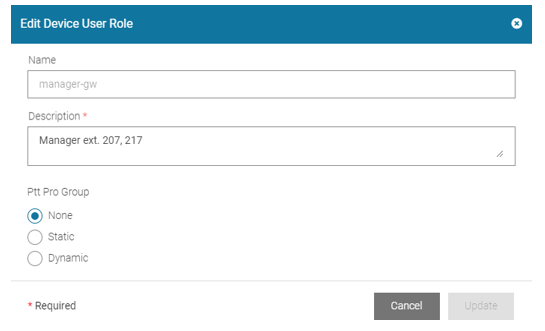
The
Edit Device User Role
dialog box appears.
Edit Device User Role Dialog Box
Update the fields.
Click
Update
.
Device User Role Management
×
 for the device user role you wish to edit.