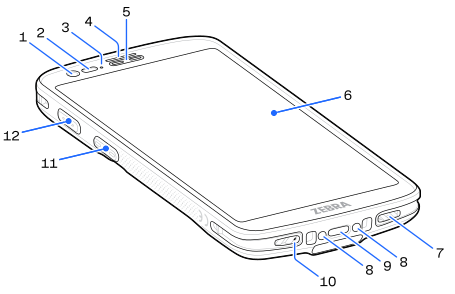
Number | Item | Description |
|---|---|---|
1 | Front Camera | Takes photos and videos. |
2 | Proximity/Light Sensor | Determines proximity and ambient light for controlling display backlight intensity. |
3 | Charging/Notification LED | Indicates battery charging status while charging and application-generated notifications. |
4 | Scan LED | Indicates data capture status. |
5 | Speaker/Receiver | Provides audio playback in handset and speakerphone mode. |
6 | Touch Screen | Displays information needed to operate the device. |
7 | Speaker | Provides audio output for video and music playback. Provides audio in speakerphone mode. |
8 | Cradle Charging Contacts | Provides device charging via cradles and accessories. |
9 | USB-C Port | Provides charging (primarily) and data communication with peripherals. |
10 | Microphone | Used for communications in Handset mode. |
11 | Scanner Button | Initiates barcode scanning (programmable). |
12 | Programmable Button | Initiates a Push-to-Talk (PTT) call (programmable). |
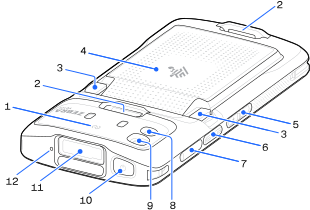
Number | Item | Description |
|---|---|---|
1 | NFC Antenna | Provides communication with other NFC-enabled devices. |
2 | Accessory Attachment Point | Provides a point for attaching optional accessories. |
3 | Battery Release Latches | Releases battery latches. |
4 | Battery | Provides power to the device. |
5 | Volume Up/Down Button | Increases and decreases audio volume (programmable). |
6 | Scanner Button | Initiates barcode scanning (programmable). |
7 | Card Holder | Holds a SIM card (WWAN) and an SD card. |
8 | Camera Flash | Provides illumination for the camera and operates as a flashlight. |
9 | Rear Camera | Takes photos and videos. |
10 | Power Button | Turns the display on and off. Press and hold to power off, restart, or lock the device. |
11 | Scanner Exit Window | Provides data capture using the imager. |
12 | Microphone | Used for communications in Speakerphone mode. |
