This section describes the steps to replace a SIM card in your TC101 device.
WWAN only.
Follow proper electrostatic discharge (ESD) precautions to prevent damage to the SIM card. Proper ESD precautions include, but are not limited to, working on an ESD mat and ensuring the operator is properly grounded.
Power off the device.
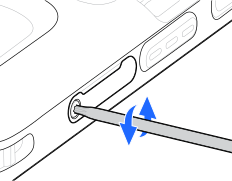
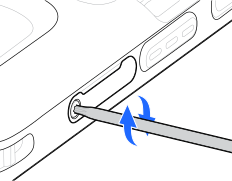
Using a T5 Torx screwdriver, unscrew the Torx 5 screw to remove the card holder.
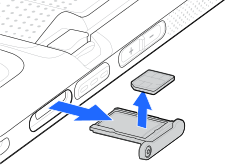
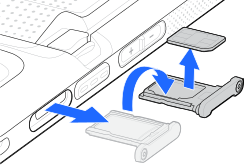
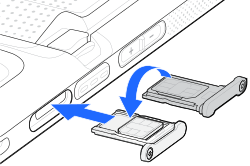
Pull the card holder out of the device, if an existing second SIM card is installed in the microSD card slot, remove it.
Flip over the card holder, and remove the existing first SIM card.
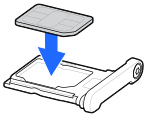
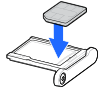
Place the replacement SIM card into the card holder with the contacts facing up.
Press the card down into the cardholder and ensure that it seats properly.
If you are using two SIM cards, flip the card holder over, and insert the replacement second SIM card into the microSD card slot.
Press the card down into the cardholder and ensure that it seats properly.
Flip over the card holder, and insert it back into the device.
Using a T5 Torx screwdriver, tighten the T5 Torx screw to a torque of 0.63 ± 0.08 kgf-cm (0.55 ± 0.07 lbf.in).