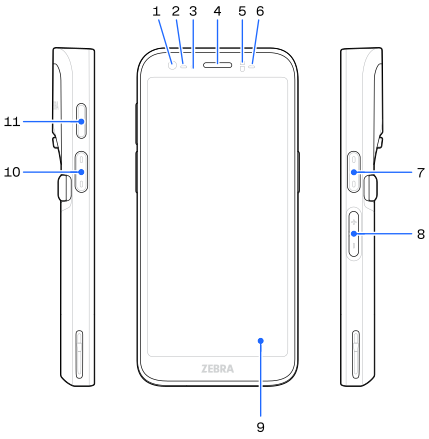
Number | Item | Description |
|---|---|---|
1 | 8 MP Front Camera | Takes photos and videos. |
2 | Scan LED | Indicates data capture status. |
3 | Charging LED | Indicates battery charging status while charging and application generated notifications. |
4 | Speaker | Used for audio playback in handset mode and acts as one of the stereo speakers in speakerphone mode. |
5 | Proximity/Light Sensor | Determines proximity and ambient light for controlling display backlight intensity. |
6 | Scan LED | Indicates data capture status. |
7 | Scanner Button | Initiates barcode scanning (programmable). |
8 | Volume Up/Down Button | Increase and decrease audio volume (programmable). |
9 | 6 in. LCD Touchscreen | Displays all information needed to operate the device. |
10 | Push-to-Talk (PTT) Button | Initiates a Push-to-Talk (PTT) call (programmable). |
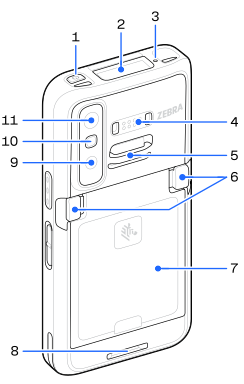
Number | Item | Description |
|---|---|---|
1 | Power button | Turns the display on and off. Press and hold to reset the device, power off, take a screenshot, or swap battery. |
2 | Scanner | Scans barcodes. |
3 | Microphone | Records audio. |
4 | Common Back IO | Enables data input and output. |
5 | Upper Accessory Attachment Point | Provides a point for attaching optional accessories. |
6 | Battery Release Latches | The latches to release the battery. |
7 | Battery | Provides power to the device. |
8 | Lower Accessory Attachment Point | Provides a point for attaching optional accessories. |
9 | Indirect Time-of-Flight (iTOF)/Ultra-wide Camera | Takes iTOF/Ultra-wide photos and videos.
This feature is only available on select SKUs. |
10 | Flash LED Lens | Provides illumination for the camera in low light conditions. |
11 | 50 MP Rear Camera | Takes photos and videos. |
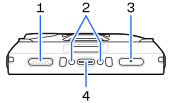
Number | Item | Description |
|---|---|---|
1 | Speaker | Provides audio output for video and music playback. Provides audio in speakerphone mode. |
2 | Bottom IO Pins | Enables charging. |
3 | Microphone | Records audio. |
4 | USB-C 3.1 Port | Provides charging (primarily) and data communication with peripherals. |
